此範例所使用之WML元件
access head meta
template noop
WML 程式碼
<!-- deck2a.wml -->
<?xml version="1.0"?>
<!DOCTYPE wml PUBLIC "-//WAPFORUM//DTD WML
1.1//EN"
"http://www.wapforum.org/DTD/wml_1.1.xml">
<wml>
<template>
<do type="prev"
name="Previous" label="Previous">
<prev/>
</do>
</template>
<card id="card1" title="First
Card" newcontext="true">
<p>
Card 1 ... <br/>
<do type="accept" label="Next
Card">
<go href="#card2"/>
</do>
<!-- Must override the DO/PREV in the
template to
prevent the PREV element from
going back to
the previous deck
-->
<do type="prev"
name="Previous">
<noop/>
</do>
</p>
</card>
<card id="card2"
title="Second Card">
<p>
Card 2 ... <br/>
<do type="accept" label="Next
Card">
<go
href="#card3"/>
</do>
</p>
</card>
<card id="card3" title="Third
Card">
<p>
Card 3 ... <br/>
<!-- NOTE: the
following DO element will go to a new
deck. The name of this
deck is embedded
in the URL.
-->
<do type="accept" label="Next
Deck">
<go
href="deck2b.wml"/>
</do>
</p>
</card>
</wml>
|
|---|
解說
以下所使用的機種介面為 Nokia 6110
當流灠第一張card 的時候,這張card僅顯示"Next
Card",因為在template宣告
的previous
項已經被宣告在card由的previous 項所覆蓋而不會做任何工作.
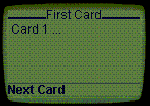
按下Next Card這個按鈕到第二張card
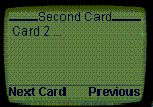
按下Next Card這個按鈕到第三張card.
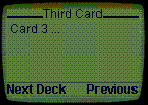
按下Next Deck這個按鈕到deck2b.wml.
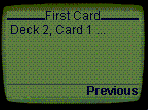
按下Previous這個按鈕可回到你上一次所流灠的card.