
| ☉ |
Character data |
|---|
Data type Explanation
CDATA
可以包含數字,文字資料型態的"字串"
不過只可使用於屬性值.
Example:
"$(value)"
name="value" (在此,value就是屬於CDATA)
PCDATA
Parsed CDATA. 跟CDATA一樣,不過PCDATA還可以包含
tags.
Example:
Text written <big> IN CAPS </big>.
NMTOKEN
A named token,可以由數字,文字或者符號所構成
(如".","-","_"和";").但不能用於變數值與element
names.
Example:
"text"
_card1
a.name.token
.a-perfectly-valid.name.token
id element的名字,但每一個element的id都是唯一的
Example:
<card id="card1"/>
Length
%length這個type可用數字來表示螢幕pixel的值,或者使用百分比表示相對於垂直或者是水平的比例.例如說"50"代表50個pixel,"50%"代表可使用空間的百分之五十.
Name
Type
Usage
%length CDATA [0-9] for pixels or [0-9] + % for percentage length.
Example(1):
For example, the values of the hspace and vspace attributes are %length.
|
<img src="bitmaps/moon.wbmp" hspace="1" vspace="1"/> <img src="bitmaps/moon.wbmp" hspace="2%" vspace="2%"/> |
|---|
| Vdata |
|---|
%Vdata代表變數名,只能用於屬性(attribute)
Name Type
Usage
%vdata CDATA Attribute value possibly containing variable references.
Example(2):
|
<card id="card1" title="$(showme)"> |
|---|
Flow, inline and layout
The %flow type represents “card-level” and the %inline type “text-level”information.
Name
Type
Usage
%layout br Text layout, such as line breaks.
%inline %text
%layout Indicates areas
where only pure text or variable references are handled.
%flow
%inline Covers
card-level elements, such as text and images.
img
anchor
a
table
Examples(3):
%flow跟%inline這類資料型態的屬性是用於表現出文件的外觀(format)
|
<em> An emphasized line. <big> A big and emphasized line. </big> </em> A line with no text formatting. |
|---|
| Text |
|---|
%type包含文字,以及formatting
Name Type
Usage
%text
#PCDATA Indicates text that contains formatting.
%emph
Example(4):
A line with plain text.
|
<em> <strong> A line with strong emphasis. </strong> </em> |
|---|
| Href |
|---|
%href type用來指向一個URL
Name Type
Usage
%href
%vdata URI, URL, or URN
designating a hypertext node. May contain variable references.
Example(5)
|
<go href="http://wapforum.org/"/> <go href="file:///d:\dir\file.wml"/> <go href="app.wml"/> The values of intrinsic events are URLs: <card onenterforward="#card2"/> The src attribute of the img element is an URL: <img src="earth.wbmp"/> |
|---|
Boolean
%boolean type指的是"true"或者是"false"
Name Type
Usage
%boolean true | false
Logical value of true or false.
Example(6):
|
<card newcontext="true"/> <do optional="true" type="accept"/> |
|---|
Number
%number代表數字
Name Type
Usage
%number NMTOKEN A number, from [0–9].
Emphasis
%emph用來表達text的formatting
Name Type
Usage
%emph em
|
Text formatting, for example italics or underlining.
strong |
b |
i |
u |
big |
small
Example(8)
|
<em> An emphasized line. <big> A big and emphasized line. </big> </em> |
|---|
Character entities and special characters
Entity
Notation
Explanation
quot
"
quotation mark
amp & #38; ampersand
apos ' apostrophe
lt < less than
gt > greater than
nbsp   non-breaking space
shy ­ soft hyphen (discretionary hyphen)
Example(9):
To include a special character, simply use the escaped notation described in
the above table. For example,
the following code includes a less than character (<) in the
escaped form <.
|
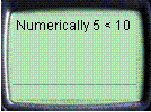
<?xml version="1.0"?> <!DOCTYPE wml PUBLIC "-//WAPFORUM//DTD WML 1.1//EN" "http://www.wapforum.org/DTD/wml_1.1.xml"> <wml> <card id="Card_1"> <p> Numerically 5 < 10 </p> </card> </wml> |
|---|
| ☉ | WML Syntax |
|---|
WML inherits most of its syntactic constructs from XML. For detailed on the syntactical issues of XML, refer to the XML Specification.
information|
Entities |
|---|
WML可以包含文字,數字以及一些字元,但是有時候有些字元在WML中是有特別的用途或者是意義的
為了讓我們可以在WML裡表達我們所想要的東西,此時必需靠著一些"符號+字元",這樣子才可以達到
我們想要的.
Example(10):
|
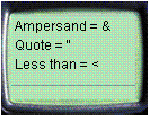
<card id="card1"> <p> Ampersand = & <br/> Quote = " <br/> Less than = < <br/> </p> </card> |
|---|
The deck generates the following user interface in the user agent:
tags
tag是一個整體的描述,例<card>是一個tag,<wml>也是一個tag
但tag可不能隨便亂標,它也有一定的型式
<tag> 這是tag的開始;有一個tag的開始,也就要有一個tag的結束
</tag> tag的結束
<tag/> 要是tag裡沒有任何的屬性或者是文字的話,那這就是一個empty element,例如說<br/>表一個換行
Element
element(標籤)是構成WML最基本的元素,其最簡單的用法便是<tag>
content </tag>或者是</tag>
其中</tag>代表它是一個empty element,沒有內文(content)
Attributes
attributes(屬性),用來表示element的額外的資訊,例如<tag attr="value"/>,記得屬性名得小寫.
而且屬性值記得用(")或(')包起來,(')可以被包含在(")裡面
有一些element一定需要用attribute來配合,例如go這個element需要href這個attribute
<go href="http://www.acme.com"/>
Comments
其使用方法跟XML一樣,在user agent劉覽時,會被省略
<!-- a comment -->
Variable
在WML裡,我們也可以像在寫程式一樣取變數,例如:
$identifier
$(identifier)
$(identifier:conversion)
其中$是用來取變數值的
Example(11):
A sequence of two dollar signs ($$) represents a single dollar sign character.
The WML code could take the following form:
|
This is a $$ character. The value is $(amount)$$. |
|---|
In the user agent, this would be displayed as:
|
This is a $ character. The value is 5000$.
|
|---|
| Case sensitivity |
|---|
在WML裡,接收event的處理物件是不一樣的
Example(12):
The following attribute values are all different:
id="Card1"
id="card1"
id="CARD1"
如上所示,雖然同一個element,但 酗T個不同的attribute value,所以當� vent發生時,
會由相對的物件來處理,並不會三個同時都有動作
Cdata section
Cdata區(讀做"c""data"),在這個區塊內的文字,在user agent劉覽時,會被一字不動的呈現出來
用法"<![cdata[ ........................]]>"
for example:
| <![cdata[ This is <b> a test ]]> |
|---|
在user agent中我們會看到
| This is <b> a test |
|---|