| Specifying Updates |
|---|
There are three SQL commands to modify the database;
| INSERT | DELETE | UPDATE |
|---|
⊕ INSERT:
In its simplest form, it is used to add a single tuple to a relation
Attribute values should be listed in the same order as the attributes were specified in the CREATE TABLE command
⊕ Example U1:
INSERT INTO EMPLOYEE VALUES ( 'Richard', 'K', 'Marini', '653298653', '30-DEC-52', '98 Oak Forest,Katy,TX', 'M', 37000, '987654321', 4 ) |
|---|
An alternate form of INSERT specifies explicitly the attribute names that correspond to the values in the new tuple
Attributes with NULL values can be left out
⊕ Example
Insert a tuple for a new EMPLOYEE for whom we only know the FNAME, LNAME, and SSN attributes. |
|---|
♦ U1A:
INSERT INTO EMPLOYEE (FNAME, LNAME, SSN)
VALUES ('Richard', 'Marini', '653298653')
|
|---|
♦ Important note:
Only the constraints specified in the DDL commands are automatically enforced by the DBMS when updates are applied to the database.
Another variation of INSERT allows insertion of multiple tuples in a relation in a single command
⊕ Example
Suppose we want to create a temporary table that has the name, number of employees, and total salaries for each department. A table DEPTS-INFO is created by U3A, and is loaded with the summary information retrieved from the database by the query in U3B. |
|---|
♦ U3A:
CREATE TABLE DEPTS_INFO (DEPT_NAME VARCHAR(10), NO_Of_EMPS INTEGER, TOTAL_SAL INTEGER); |
|---|
♦ U3B:
INSERT INTO EEPTS_INFO (DEPT_NAME, NO_OF_EMPS, TOTAL_SAL) SELECT DNAME, COUNT (*), SUM (SALARY) FROM DEPARTMENT, EMPLOYEE WHERE DNUMBER=DNO GROUP BY DNAME; |
|---|
♦ NOTE:
The DEPTS-INFO table may not be up-to-date if we change the tuples in either the DEPARTMENT or the EMPLOYEE relations after issuing U3B. We have to create a view (see later) to keep such a table up to date
| DELETE |
|---|
♦ Removes tuples from a relation
Includes a WHERE-clause to select the tuples to be deleted
Tuples are deleted from only one table at a time
A missing WHERE-clause specifies that all tuples in the relation are to be deleted; the table then becomes an empty table
The number of tuples deleted depends on the number of tuples in the relation that satisfy the WHERE-clause condition
⊕ Example
♦ U4A:
DELETE FROM EMPLOYEE WHERE LNAME='Brown' |
|---|
♦ U4B:
DELETE FROM EMPLOYEE WHERE SSN='l23456789' |
|---|
♦ U4C
DELETE FROM EMPLOYEE WHERE DNO IN (SELECT DNUMBER FROM DEPARTMENT WHERE DNAME='Research') |
|---|
♦ U4D:
DELETE FROM EMPLOYEE |
|---|
| UPDATE |
|---|
♦ Used to modify attribute values of one or more selected tuples
A WHERE-clause selects the tuples to be modified
An additional SET-clause specifies the attributes to be modified and their new values
Each command modifies tuples in the same relation
⊕ Example:
Change the location and controlling department number of project number 10 to 'Bellaire` and 5, respectively. |
|---|
♦ U5:
UPDATE PROJECT SET PLOCATION = 'Bellaire', DNUM = 5 WHERE PNUMBER=10 |
|---|
⊕ Example:
Give all employees in the 'Research' department a 10% raise in salary. |
|---|
♦ U6:
UPDATE EMPLOYEE
SET SALARY = SALARY *1.1
WHERE DNO IN (SELECT DNUMBER
              FROM DEPARTMENT
              WHERE DNAME='Research')
|
|---|
In this request, the modified SALARY value depends on the original SALARY value in each tuple
The reference to the SALARY attribute on the right of = refers to the old SALARY value before modification
The reference to the SALARY attribute on the left of = refers to the new SALARY value after modification
| Relational Views in SQL |
|---|
♦ A view is a single virtual table that is derived from other tables
The other tables could be base tables or previously defined views
A view does not necessarily exist in physical form, which limits the possible update operations that can be applied to views
There are no limitations on querying a view
The CREATE VIEW command is used to specify a view by specifying a (virtual) table name and a defining query
The view attribute names can be inherited from the attribute names of the tables in the defining query
⊕ Examples
♦ V1:
CREATE VIEW WORKS_ON1 AS SELECT FNAME,LNAME,PNAME,HOURS FROM EMPLOYEE, PROJECT, WORKS_ON WHERE SSN=ESSN AND PNO=PNUMBER; |
|---|
| view name: WORKS_ON1 | |||
|---|---|---|---|
| FNAME | LNAME | PNAME | HOURS |
| relation name: EMPLOYEE | ||||||
|---|---|---|---|---|---|---|
| FNAME | MNAME | LNAME | SSN | |||
| relation name: PROJECT | |||
|---|---|---|---|
| PNAME | PNUM | PLOCATION | DNUM |
| relation name: WORK_ON | ||
|---|---|---|
| ESSN | PNO | HOURS |
♦ V2:
CREATE VIEW DEPT_INFO (DEPT_NAME, NO_OF_EMPS, TOTAL_SAL) AS SELECT DNAME, COUNT (*), SUM (SALARY) FROM DEPARTMENT, EMPLOYEE WHERE DNUMBER=DNO GROUP BY DNAME; |
|---|
| view name: DEPT_INFO | |||
|---|---|---|---|
| DEPT_NAME | NO_OF_EMPS | TOTAL_SAL | |
In V1 the names of the view attribute names are inherited
In V2, the view attribute names are listed using a one-to-one correspondence with the entries in the SELECT-clause of the defining query
| Queries On Views |
|---|
⊕ Example
Retrieve the last name and First name of all employees who work on 'ProjectX'. |
|---|
| view name: WORKS_ON1 | |||
|---|---|---|---|
| FNAME | LNAME | PNAME | HOURS |
⊕ QV1:
SELECT PNAME,FNAME,LNAME FROM WORKS_ON1 WHERE PNAME='ProjectX'; |
|---|
Without the view WORKS_ON1 , this query specification would require two join conditions
A view can be defined to simplify frequently occurring queries
The DBMS is responsible for keeping the view always up-to-date if the base tables on which the view is defined are modified
Hence, the view is not realized at the time of view definition, but rather at the time we specify a query on the view
A view is removed using the DROP VIEW command
⊕ Example
V1A: DROP VIEW WORKS_ON1; |
|---|
V2A: DROP VIEW DEPT_INFO; |
|---|
Views can also be used as a security and authorization mechanism See Chapter 20
| View Processing |
|---|

| Updating Of Views |
|---|
A view update operation may be mapped in multiple ways to update operations on the defining base relations
The topic of updating views is still an active research area
⊕ Example
Suppose we issue the command in UV1 to update the WORKS_ON1 view by modifying the PNAME attribute of 'John Smith' from 'ProductX' to 'ProductY'. |
|---|
| view name: WORKS_ON1 | |||
|---|---|---|---|
| FNAME | LNAME | PNAME | HOURS |
⊕ UV1:
UPDATE WORKS_ON1
SET    PNAME = 'productY'
WHERE  LNAME='Smith' AND FNAME='John' AND
       PNAME='productX'
|
|---|
This can be mapped into several updates on the base relations to give the desired update on the view. Two possibilities are:
♦ (l) Change the name of the 'ProductX' tuple in the PROJECT relation to 'ProductY'
It is quite unlikely that the user who specified the view update UV1 wants the update to be interpreted this way
⊕ (l):
UPDATE PROJECT SET PNAME = 'ProductY' WHERE PNAME = 'productX' |
|---|
| WORK_ON1 | FNAME | LNAME | PNAME | HOURS |
|---|
| EMPLOYEE | FNAME | MNAME | LNAME | SSN |
|---|
| PROJECT | PNAME | PNUM | PLOCATION | DNUM
| | 123 | Taipei | 703
| ProductY
| 456
| KaoHsiung
| 201
| |
|---|
| WORK_ON | ESSN | PNO | HOURS |
|---|
♦ (2) Relate 'John Smith' to the 'ProductY' PROJECT tuple in place of the 'ProductX' PROJECT tuple
This is most likely the update the user means
⊕ (2):
UPDATE WORKS_ON
    SET PNO= (SELECT PNUMBER FROM PROJECT
	      WHERE PNAME='ProductY')
WHERE ESSN = (SELECT SSN FROM EMPLOYEE
              WHERE LNAME='Smith' AND FNAME='John')
AND    PNO = (SELECT PNUMBER FROM PROJECT
              WHERE PNAME='ProductX')
|
|---|
| WORK_ON1 | FNAME | LNAME | PNAME | HOURS
| John
| Smith
| Database
| 20
| |
|---|
| EMPLOYEE | FNAME | MNAME | LNAME | SSN | |||
|---|---|---|---|---|---|---|---|
| John | C. | Smith | 9876543 |
| PROJECT | PNAME | PNUM | PLOCATION | DNUM
| ProductX
| 123
| Taipei
| 703
| ProductY
| 456
| KaoHsiung
| 201
| |
|---|
| WORK_ON | ESSN | PNO | HOURS
| 9876543
|
| 20
| |
|---|
Some view updates may not make much sense; for example, modifying the TOTAL_SAL attribute of DEPT_INFO as in UV2
⊕ UV2:
MODIFY DEPT INFO SET TOTAL_SAL=100000 WHERE DNAME='Research'; |
|---|
| view name: DEPT_INFO | |||
|---|---|---|---|
| DEPT_NAME | NO_OF_EMPS | TOTAL_SAL | |
In general, we cannot guarantee that any view can be updated
A view update is unambiguous only if one update on the base relations can accomplish the desired update effect on the view
If a view update can be mapped to more than one update on the underlying base relations, we must have a certain procedure to choose the desired update
⊕ We can make the following general observations:
♦ A view with a single defining table is updatable if the view attributes contain the primary key
♦ Views defined on multiple tables using joins are generally not updatable
♦ Views defined aggregate functions are not updatable
| Creating indexes in SQL |
|---|
An SQL base relation generally corresponds to a stored file
♦ SQL has statements to create and drop indexes on base relations
One or more indexing attributes are specified for each index
The CREATE INDEX command is used to specify an index
Each index is given an index name
⊕ Example I1:
CREATE INDEX LNAME INDEX ON EMPLOYEE ( LNAME ); |
|---|
The index entries are in ascending (ASC) order of the indexing attributes; for descending order, the keyword DESC is added
An index can be created on a combination of attributes
⊕ Example I2:
CREATE INDEX NAMES INDEX ON EMPLOYEE ( LNAME ASC, FNAME DESC, MINIT ); |
|---|
Two options on indexes in SQL are UNIQUE and CLUSTER
To specify the key constraint on the indexing attribute or combination of attributes, the keyword UNIQUE is used
⊕ Example I3:
CREATE UNIQUE INDEX SSN-INDEX ON EMPLOYEE ( SSN ); |
|---|
This is best done before any tuples are inserted in the relation
An attempt to create a unique index on an existing base table will fail if the current tuples in the table do not obey the constraint.
A second option on index creation is to specify that the index is a clustering index using the keyword CLUSTER
A base relation can have at most one clustering index, but any number of non-clustering indexes
⊕ Example: I4:
CREATE INDEX DNO_INDEX
          ON EMPLOYEE ( DNO )
             CLUSTER;
|
|---|
A clustering and unique index in SQL is similar to the primary index of Chapter 5
A clustering but non-unique index in SQL is similar to the clustering index of Chapter 5
A non-clustering index is similar to the secondary index of Chapter 5
Each DBMS will have its own index implementation technique, in most cases, some variation of the B+-tree data structure is used
To drop an index, we issue the DROP INDEX command
The index name is needed to refer to the index when it is to be dropped
⊕ Example I5:
DROP INDEX DNO INDEX: |
|---|
| Embedded SQL |
|---|
⊕ Embedding SQL in a Programming Language
SQL can also be used in conjunction with a general purpose programming language, such as PASCAL, COBOL, or PL/I
The programming language is called the host language
The embedded SQL statement is distinguished from programming language statements by prefixing it with a special character or command so that a preprocessor can extract the SQL statements
In PL/1 the keywords EXEC SQL precede any SQL statement
In some implementations, SQL statements are passed as parameters in procedure calls
We will use PASCAL as the host programming language, and a "$" sign to identify SQL statements in the program
Within an embedded SQL command, we may refer to program variables, which are prefixed by a ',%'' sign
The programmer should declare program variables to match the data types of the database attributes that the program will process
These program variables may or may not have names that are identical to their corresponding attributes
⊕ Example
Write a program segment (loop) that reads a social security number and prints out some information from the corresponding EMPLOYEE tuple |
|---|
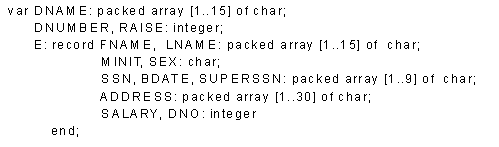
♦ E1:
LOOP:='Y';
while LOOP = 'Y' do
   begin
   writeln('input social security number:');
   readln(SOC_SEC_NUM);
   $SELECT FNAME, MINIT, LNAME, SSN, BDATE, ADDRESS,
           SALARY
   INTO %E.FNAME, %E.MINIT, %E.LNAME, %E.SSN,
           %E.BDATE, %E.ADDRESS, %E.SALARY
   FROM EMPLOYEE
   WHERE SSN= %SOC_SEC_NUM;
   writeln( E.FNAME, E.MINIT, E.LNAME, E.SSN, E.BDATE,
           E.ADDRESS, E.SALARY);
   writeln('more social security numbers (Y or N)? ');
   readln(LOOP)
   end;
|
|---|
In E1, a single tuple is selected by the embedded SQL query, that is why we are able to assign its attribute values directly to program variables
In general, an SQL query can retrieve many tuples
The concept of a cursor is used to allow tuple-at-a-time processing
| Cursors |
|---|
We can think of a cursor as a pointer that points to a single tuple (row) from the result of a query
The cursor is declared when the SQL query command is specified
A subsequent OPEN cursor command fetches the query result and sets the cursor to a position before the first row in the result of the query, this becomes the current row for the cursor
Subsequent FETCH commands in the program advance the cursor to the next row and copy its attribute values into PASCAL program variables specified in the FETCH command
An implicit variable SQLCODE communicates to the program the status of SQL embedded commands
An SQLCODE of 0 (zero) indicates successful execution
Different codes are returned to indicate exceptions and errors
A special END_OF_CURSOR code is used to terminate a loop over the tuples in a query result
A CLOSE cursor command is issued to indicate that we are done with the result of the query
When a cursor is defined for rows that are to be updated the clause FOR UPDATE OF must be in the cursor declaration. and a list of the names of any attributes that will be updated follows
The condition WHERE CURRENT OF cursor specified that the current tuple is the one to be updated (or deleted)
♦ Example
Write a program segment tyat reads (inputs) a department name, then lists the names of employees who work in that department, one at a time. The program reads a raise amount for each employee and updates the employee`s salary by that amount. |
|---|
♦ E2:
writeln('enter the department name:');
readln(DNAME);
$SELECT DNUMBER INTO %DNUMBER
FROM DEPARTMENT
WHERE DNAME=%DNAME;
$DECLARE EMP CURSOR FOR
   SELECT SSN, FNAME, MINIT, LNAME, SALARY
   FROM EMPLOYEE
   WHERE DNO= %DNUMBER
FOR UPDATE OF SALARY;
$OPEN EMP;
$FETCH EMP INTO %E.SSN, %E.FNAME, %E.MINIT,
                %E.LNAME, %E.SAL;
while SQLCODE = 0 do
   begin
   writeln('employee name:', E.FNAME, E.MINIT, E.LNAME);
   writeln('enter raise amount: ');
   readln(RAISE);
   $UPDATE EMPLOYEE SET SALARY = SALARY + %RAISE
   WHERE CURRENT OF EMP;
   $FETCH EMP INTO %E.SSN, %E.FNAME, %E.MINIT,
                   %E.LNAME, %E.SAL;
   end;
$CLOSE CURSOR EMP;
|
|---|